Help · Frequently asked questions
FAQ
Answers to the most-asked questions about arrival, getting around, Wi-Fi, waste disposal and on-site services. Question not covered? Message us on WhatsApp or by email.
Booking
Booking, check-in & invoices
01
Arrival is possible from 14:00 until 20:00. We take no arrivals after 20:00 — we sit between residential houses, and manoeuvring and setting up in the dark carry to every neighbour. If you are held up on the road, message us before 20:00 and ask for a later arrival: if it can be accommodated, we confirm an arrival until 22:00 at the latest. Without our confirmation there is no arrival after 20:00. Departure must take place by 11:00 at the latest. Please note that our sanitary facilities may be closed for cleaning for some time in the early morning.
If you wish to stay longer without paying for another night, you can move your motorhome or caravan onto the service ramp next to the pitches (please not later than 16:00, so that new guests can use our facilities after their arrival). Please leave us a short message if you do this.
02
For every booking, we send out an invoice and a booking confirmation immediately after successful payment. On the day of your check-in we also send you a check-in email with important information about your arrival and all required passwords.
If you have also purchased vouchers (e.g. electricity vouchers), you receive a separate email with all voucher codes and information on how to activate them.
If you cannot find these emails in your inbox, please check your spam / junk mail folder. Despite all the precautions we take on our side, some providers (such as Hotmail and others) do not configure their spam filters well enough. This may cause our emails to be flagged as “Junk” or “Spam” by your email provider. In such cases, please set up a different email account (Gmail is a good free alternative).
In some cases, due to overly strict spam filtering, our emails may be deleted by your email provider immediately after reaching your inbox. If this is the case for you, please switch your email provider as soon as possible.
03
For any paid booking you can request a dedicated invoice afterwards — addressed to your employer, research institution or club, for example. All you need is your booking number and the email address used to book.
Mountaincamp e.U. is a small business under § 6(1)27 of the Austrian VAT Act, so no VAT is itemised. The local tax (Ortstaxe) appears as a separate pass-through item and is not part of the taxable supply.
One invoice is issued per booking. If you lose the PDF, you can download it again through the same form.
On site
Waste, getting around & Wi-Fi
04
Rubbish
You can drop off rubbish in our recycling bins behind the base station — provided you have already sorted your rubbish. You can also use one of the public bins around the upper restaurant parking lot for small amounts. Please take everything else with you and recycle your rubbish at one of the next recycling islands.
Chemical toilet
Empty your chemical toilet here as normal: the signposted drain below the camper service area (ramp) is there for exactly that — free, any time, no need to ask. This one is genuinely no trouble for us.
Grey water
Here we ask for your help. There is a grey-water outlet, but it sits at the camper service area on the ramp and is operated with a hose — with panel vans and compact campers that tends to be awkward. On top of that, we are not yet connected to the public sewer, which makes disposal disproportionately expensive for us. So we ask you to empty your grey-water tank on your onward journey: either at the self-service car wash in Steyregg, or at one of the gullies marked on our map. Those are combined sewers taken from Steyregg’s official sewer plans — they run straight to the treatment plant. Thank you!
05
Central Linz is easy to reach. The most comfortable option is to let someone else drive. You have these options:
Taxi & ride-hailing apps
You can order the Linz radio taxi 6969 by phone at +43 732 6969 — its own app unfortunately often does not work for guests from abroad. With a foreign credit card and international account, the Uber app works reliably instead; Uber operates in Linz.
Bus & tram
Public transport is the cheapest way: bus line 33 heads towards the city. Even nicer is the tram — board line 1 at its Universität (JKU) terminus and ride straight into the centre.
06
On Apple / iOS devices, entering login and password is usually enough. Android is a bit more involved:
First check your email for the login and password we sent you in a separate email after payment.
- 1
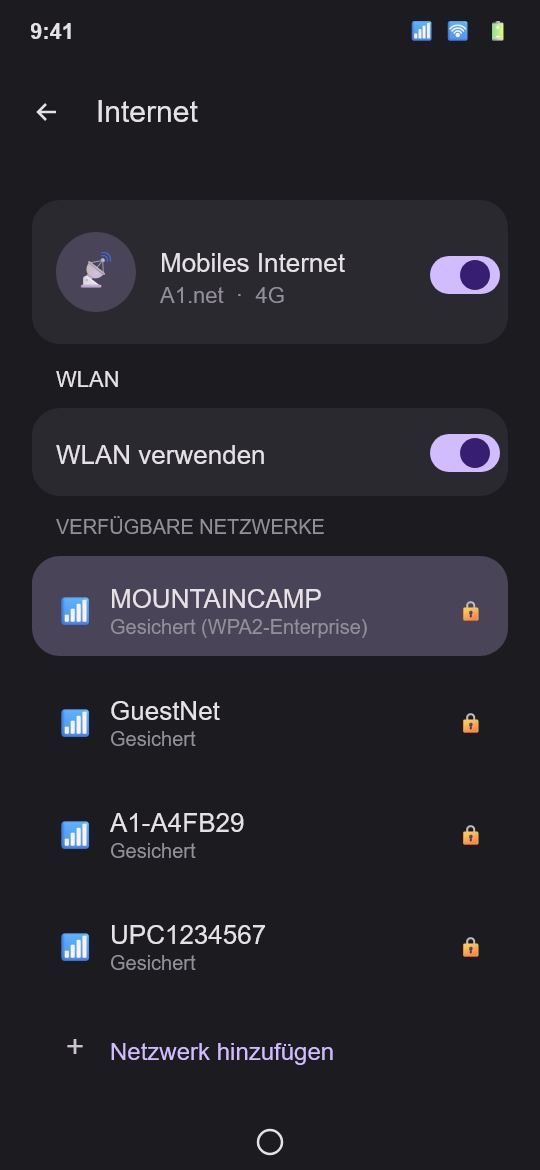
Open the Wi-Fi settings on your Android device and tap “Add network”, or tap directly on the network named “MOUNTAINCAMP”.
- 2
Fill in the fields as follows:
Identity your login from the email Password the password from the email CA certificate Trust on first use (TOFU) EAP method PEAP Phase-2 authentication MSCHAPV2 IP settings DHCP 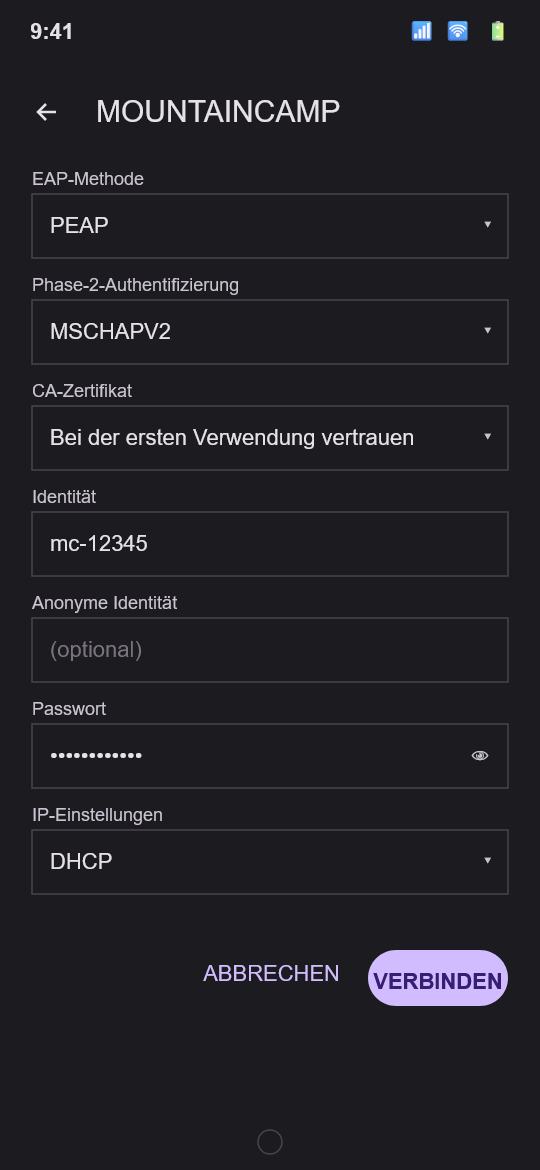
- 3
Then scroll down and tap “CONNECT”. You may be asked to confirm our system certificate (tap “Yes” or “Trust”).
If problems persist, message us on WhatsApp.